Showing posts with label By Green ViruZ. Show all posts

Monday, 6 January 2014

USE PEN-DRIVE AS RAM


We use USB to transfer the data’s. The USB can be used asRAM. Let’s start with windows vista; those who use pc’s can use their USBdrives to increase the performances of their computer. This is called ReadyBoost. Ready Boost deal with free spacethat is on your USB drives, such as RAM. When we increase RAM that’s equal to more speed. Ready Boost comprise on all free versions ofwindows vista and windows 7. It’s easy to setup the positions and in fewminutes it can be finished.

Insert the USB drive in your computer.
Go to "My Computer" then right-click on the USB drive.
Go to "Properties"
Next, click on the "ReadyBoost" tab.
Choose the option that says "Use this device".
Under "Space to reserve for system speed", select the amount of memory that you wish to use for your USB flash drive. The amount of memory that Windows recommends is usually the best setting and should not be exceeded.
Click on "OK" to save your settings and exit.
Restart your computer for the changes to take affect.


Ready Boost At AutoPlay
Ready Boost Settings


How To Create A Folder Named Con

It was discovered that nobody can create a folder named as "con" in windows using modern method.
This is something pretty cool...and unbelievable...
Note : This should be through & in windows only.
 
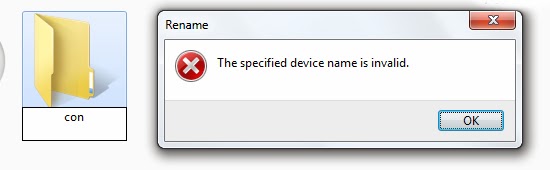
This is what happen when you try to create a folder named "con" using standard method
This is what happen when you try to create a folder named con using standard method


 To create a folder you have to do the following steps

1) open cmd 
       win + r (opn run)
       type cmd 

then in cmd type mkdir e:\con\ 


(you can give any drive letter as the drive in which you want to create the folder)

 
Codes For Creating Folder Named Con In Drive E:


Result - Created a Folder In Local Drive E:


 To create a folder you have to do the following steps

1) open cmd 
       win + r (opn run)
       type cmd 

then in cmd type rmdir e:\con\

Codes For Deleting Folder Named Con From Drive E:


there are also some other names which cannot be created using standard methods

 they are - CON, PRN, AUX, CLOCK$, NUL, COM1, COM2, COM3, COM4, COM5, COM6, COM7, COM8, COM9,
LPT1, LPT2, LPT3, LPT4, LPT5, LPT6, LPT7, LPT8, LPT9 


   Green ViruZ